

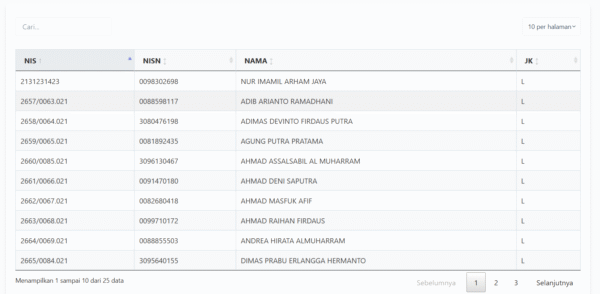

Plugin ini memungkinkan Anda untuk menampilkan data dari Google Sheet ke dalam tabel di website WordPress Anda. Data akan diperbarui secara otomatis ketika ada perubahan di Google Sheet.
Fitur
- Pembaruan data secara realtime
- Pencarian data dalam tabel
- Pengaturan jumlah baris per halaman
- Pengurutan data berdasarkan kolom
- Tampilan responsif
- Kompatibel dengan tema WordPress
Instalasi
- Unggah folder plugin ke direktori
/wp-content/plugins/ - Aktifkan plugin melalui menu ‘Plugins’ di WordPress
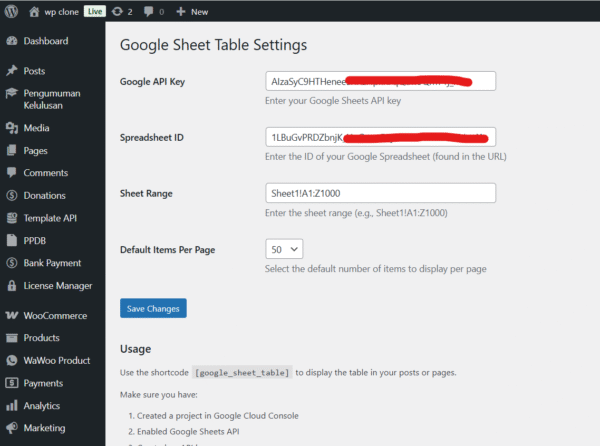
- Masuk ke pengaturan plugin dan masukkan:
- API Key Google Sheets
- ID Spreadsheet
- Range Sheet (contoh: Sheet1!A1:Z1000)
Penggunaan
Gunakan shortcode berikut untuk menampilkan tabel di halaman atau posting:
[google_sheet_table]
Parameter Opsional
class: Menambahkan kelas CSS kustom ke tabelper_page: Mengatur jumlah baris per halaman (default: 10)
Contoh:
[google_sheet_table class="my-custom-table" per_page="25"]
Pengaturan
- Buka menu ‘Settings > Realtime Google Sheet Table’
- Masukkan informasi yang diperlukan:
- Google Sheets API Key
- ID Spreadsheet
- Range Sheet
Requirement
- WordPress 5.0 atau lebih tinggi
- PHP 7.0 atau lebih tinggi
- API Key Google Sheets yang valid
- Spreadsheet yang dapat diakses publik







Reviews
There are no reviews yet.